The core of Microsoft Sentinel are the alerts and incidents, the ability to investigate problems in your organisation and gather insights is crucial to reducing investigation time and resolving the problem at hand. Entities are just one part of this.
What is an Entity?
Something that exists apart from other things, having its own independent existence.
https://dictionary.cambridge.org/dictionary/english/entity?q=Entity
In terms of Microsoft Sentinel, an entity is a data item which can be categorised by relevant attributes, much like a class in programming. It can help you to answer the who, what, where and how of your investigation. Take the following example:
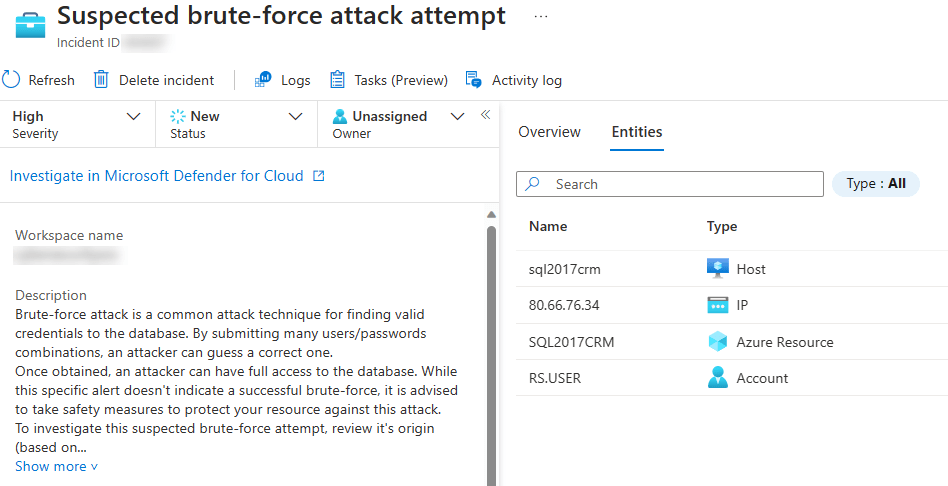
Here we have a suspected brute-force attack attempt incident in Microsoft Sentinel, generated by Microsoft Defender for Cloud. It shows the incident name, description and the entities related to it. Drilling further into the alerts you can identify that
- The “Who” that was performing the attack was an IP address. It does not tell us the actual individual, but where the attack originated from
- The “What” is the user account. This is what the attacker was trying to compromise.
- The “Where” is where the login attempt was made, in this case a host called sql2017crm. Also note it is an Azure Resource too.
Now the who, what, where and how is not always going to be straight forward and the data will need to be interpreted based on the event that is monitored. However collecting entity details allows you to discover relationships between monitored events, through alerts and bookmarks. This allows you to discover actions that have occurred that may correspond to the threat you are tracking, or potentially discover other threats. In the example below, using the investigation blade, you can see that the IP address entity (centre) has multiple alerts related to it (right-hand alerts connected via black and red dashed lines) as well as the original investigated incident (left-hand alert, connected via solid red line)

Entities are not limited to just the ones previously mentioned, Microsoft Sentinel can categories the following entity types:
- User account
- Host
- IP address
- Malware
- File
- Process
- Cloud application
- Domain name
- Azure resource
- File hash
- Registry key
- Registry value
- Security group
- URL
- IoT device
- Mailbox
- Mail cluster
- Mail message
- Submission mail
Each one has various attributes which can be used to identify them, which I will talk about in later articles.
Beyond just collecting entity information certain entities can be profiled within Microsoft Sentinel, with User and Entity Behaviour Analytics. Keeping it simple, User and Entity Behaviour Analytics or UEBA for short collects logs and alerts from your data sources, analyses them and builds a behavioural profile of your organisations entities. This does not mean Microsoft Sentinel is reporting on every single action a person is doing, but instead determining what is normal and abnormal behaviour.
For example a user may log into a server that they have never logged into before and their peers never logs into either, this would be deemed abnormal behaviour. This could be a sign the user has been compromised from another something taking control of their account, or an insider threat where the user themselves are now acting with malicious intent.
Currently User and Entity Behaviour Analytics support at this time:
- Accounts
- Hosts
- IP address (preview)
- Azure Resource (preview)
- IoT Devices (preview)
In the next article, I will talk about mapping entities and what data to use to identify your entities.
 The Cloud Brain Dump - By TheAlistairRoss