Have you ever looked at in your security logs and thought:
“There is absolutely no way Clark went from Metropolis to London in 30 minutes.. unless he is secretly Superman.”
Then you’ve either discovered the man of steel, or stumbled into the world of Impossible Travel.
This post is a walk through of a Microsoft Sentinel KQL detection that flags cases where a user appears to sign in from two far-apart locations faster than physically plausible—often a big blinking sign of compromised credentials.
Why have you built this when Microsoft already does it built in?
Yes, you are correct, built into Microsoft Defender for Cloud apps is the impossible travel anomaly detection and lets be honest, the engineering on the backend will be far better than my query, but my defense is:
- I can’t help myself sometimes and I just write detection’s to understand the art of the possible
- My query can be customized, you may not have Defender for Cloud apps enabled, or are using other data sources which you want to incorporate.
If your not sure which one to use, then use the built in anomaly detection in Defender as my query has been designed as a starting point for you to build upon.
We’ll cover:
- What “impossible travel” actually means (and when it doesn’t)
- Why “visits” beat raw sign-in events
- How S2 cells stop your detection from freaking out because someone walked to the kitchen
- The query flow (step-by-step)
- Tuning tips to reduce the “yes it’s suspicious but also it’s our VPN again” problem
What is “Impossible Travel”?
The idea is simple:
- A user signs in from Location A
- Then signs in from Location B
- The time between those sign-ins is too short to physically travel that distance
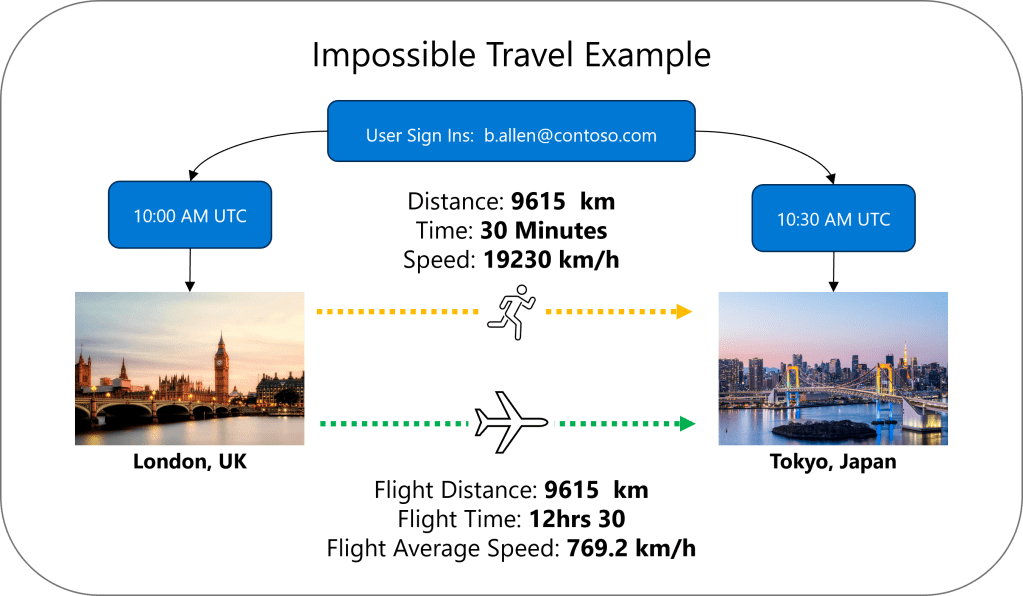
Example: The user b.allen@contoso.com has legitimate sign in activity occurring at 10:00 am in London, UK, then again at 10:30 AM in Tokyo, Japan. With an estimated flight distance of 9615 km, unless they are the Flash, there is no way they are traveling at over 19000 km/h or even doing that on a commercial aircraft which would take approximately 12 hrs 30 minutes.
Common causes when this triggers:
- Stolen credentials used from another region
- VPN traffic that routes your connections to another location
- Split tunneling where some signals originate from you actual location, and others are routed via the corporate network.
Why “Visits” Beat Raw Sign-ins
If you compare every sign-in event with every other sign-in event, in some SIEMs you’ll quickly invent a new SIEM pricing tier called “bankruptcy“
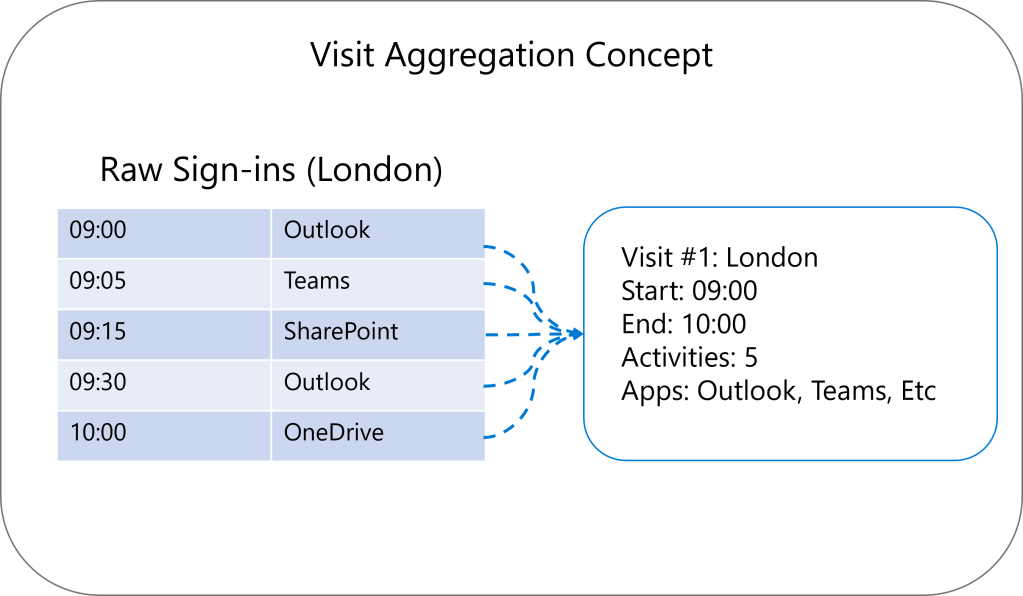
Modern identity generates loads of events: token refreshes, app sign-ins, background auth, etc. So instead, this approach groups activity data into visits:
A “Visit” = all user activity in one geographic area, within a session.
Visual: Raw Sign-ins → One Visit
Why this matters:
- Less noise
- Less compute
- Better “story” of what happened
S2 Cells: Because GPS Jitter is Not an Incident
Even within one office, IP-based geographical location can wobble. If you treat every slightly different coordinate as a new location, your “impossible travel” detection becomes “impossible productivity”.
So the query uses S2 Cells: a hierarchical grid that partitions Earth into consistent regions, letting you cluster nearby sign-ins together.
This query uses S2 level 8 by default (roughly metro-sized ~10–25km), which helps ensure:
- Movement within a city doesn’t trigger alerts
- Real cross-city / cross-country movement does
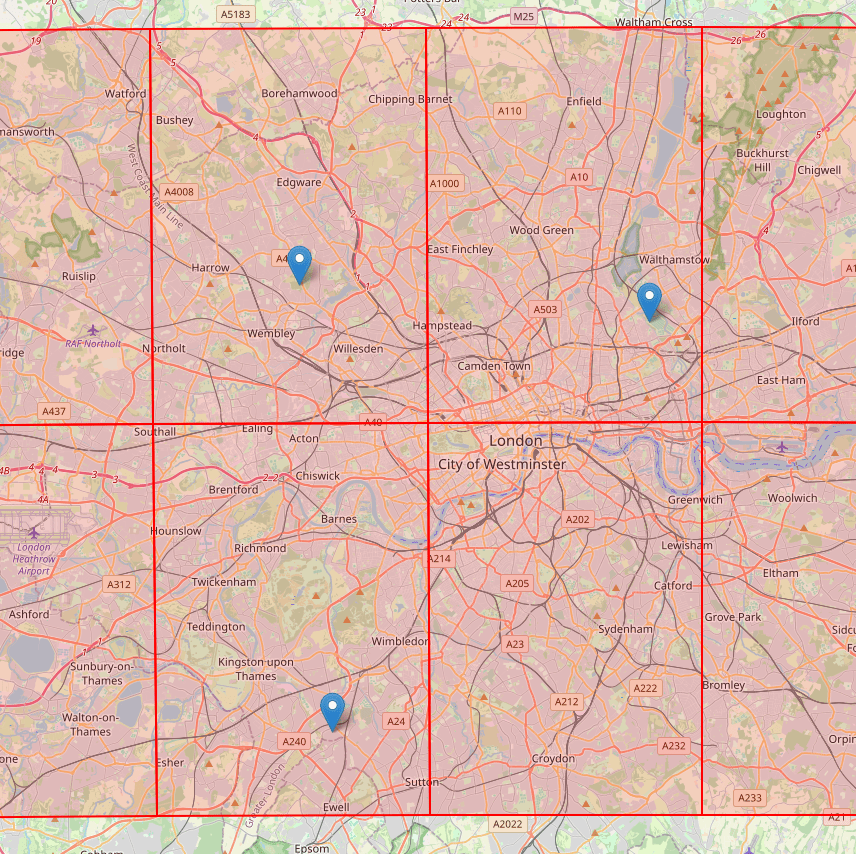
This image shows three points in London that represent a users location, or at least the longitude and latitude related to the IP address. The image shows each point inside a red cell, specifically a S2 Cell at size level 9. This level of accuracy may be too noisy when aggregating data.
The image below shows the same points now within a level 8 S2 cell. This shows that all these events would be grouped together as a single location.
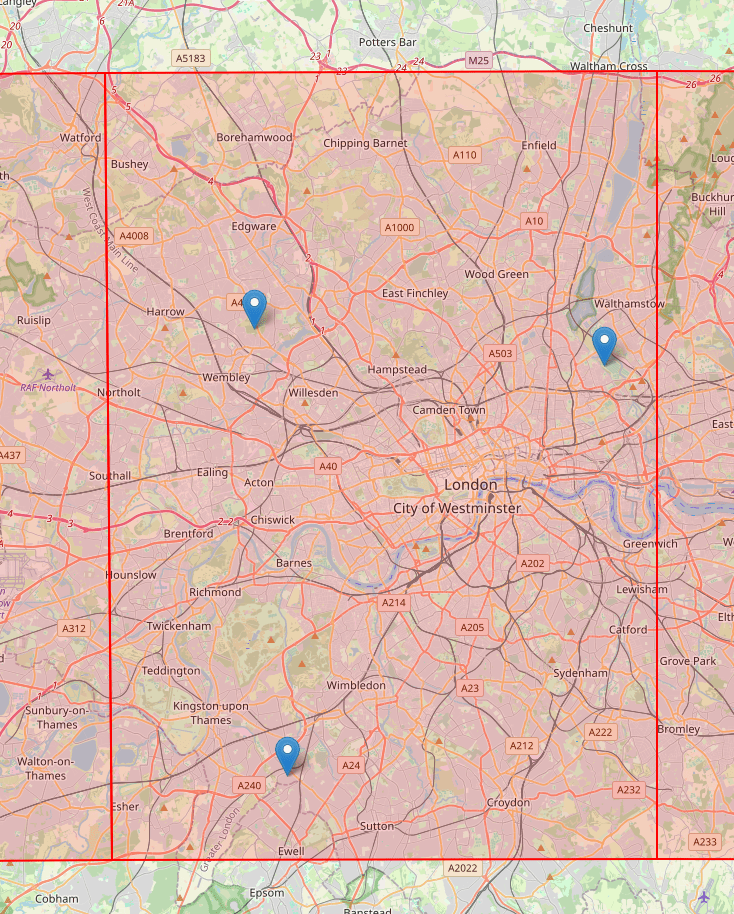
The location which will now be used for the visit will be the central point of the S2 cell for the visits within this area.
- If you want to read more about S2 cells, check out the documentation here. https://s2geometry.io/
- If you want to overlay S2 cells on a global map, then check out this great tool here. https://igorgatis.github.io/ws2/
The Query Flow (Big Picture)
Here’s the detection pipeline at a glance:
- SigninLogs: Raw events from Microsoft Entra Id
- Filter & Enrich sign-ins
- Successful logins only (ResultType == 0)
- Exclude known VPN ranges
- Lookup physical office locations (watchlist)
- Calculate S2 cell for location
- Sessionise Activities
- Group consecutive activities at same location
- If gap > 4 hours, start new session
- Handles A→B→A travel patterns
- Aggregate into Visits
- One row per user per location per session
- Calculate visit start/end times
- Collect IP addresses, apps, MFA status
- Compare Visits (Self-Join)
- Find pairs of visits for same user
- Different locations, chronologically ordered
- Calculate time between visits
- Calculate Distance & Speed
- Distance between S2 cell centers
- Required travel speed
- Filter: Speed > Car Speed
- Calculate Probability and Risk Factor
- Probability by mode of transport
- Sign in factors that influence risk
- Results
Step-by-Step: The Bits That Matter
1) Parameters (Your “tuning knobs”)
These are the defaults used by the query:
| Variable Name | Default Value | Description |
| CarSpeedKmH | 100 | Average car travel speed. Trips requiring faster speeds are flagged. |
| TrainSpeedKmH | 250 | High-speed rail threshold. |
| PlaneSpeedKmH | 800 | Maximum realistic speed (commercial aviation). Faster = impossible. |
| LookbackPeriod | 1d | Number of days of sign-in data to analyze |
| MinTimeBetweenVisitsMinutes | 15 | Ignore visits too close together (likely same session) |
| MinDistanceKm | 100 | Ignore alerts for nearby locations (cell boundary crossings) |
| MaxSessionGap | 4 | If no activity for 4 hours, the next activity starts a new visit |
| S2CellLevel | 8 | Geographic clustering precision |
If you ever wonder “why didn’t it alert?” or “why did it alert 400 times?”, you’ll end up here.
2) Your VPN Ranges
The variable KnownVPNRanges contains a list of Network Ids and their subnet mask. Using either a watchlist (preferred), a workspace function or hard coding these into the detection, use this to get rid of any virtual locations. Be sure to remove any IP ranges for virtual networks, such as sign ins originating from a virtual desktop in an Azure Data Center.
3) Office IP Overrides (A.K.A. “Azure thinks our HQ is in Amsterdam”)
This is a hugely practical trick: a small watchlist table of known subnets mapped to their true physical location.
Why?
- Network Address Translation
- Corporate egress points
- VPN exit points
- cloud routing weirdness
All of those can make IP geographical location misleading, and that creates false positives. This watchlist is for all those known office networks, which the locations that cause you to appear elsewhere, potentially hundreds of miles from your actual location.
3) Filter & Enrich Sign-ins
The query:
- keeps successful logins (ResultType == 0)
- excludes known VPN ranges
- applies subnet overrides from a watchlist (ipv4 lookup) if avaliable, otherwise use the Entra Id provided location
- then converts the location data into an S2 cell
4) Sessionize (So A→B→A Doesn’t Merge into One Blob)
If a user goes London → Paris → London, you don’t want one “giant London visit spanning across the trip to Paris”.
So the query uses a session window function that creates a new session when:
- user changes
- location cell changes
- the gap exceeds MaxSessionGap (4 hours)
5) Aggregate into Visits
Once sign-ins are sessionized, the query collapses them into “visits”:
- start/end
- activity count
- distinct IP count
- sets of apps and user agents
- MFA usage counters
This is where the query stops being “logs” and becomes “a story”.
6) Compare Visits (Self-Join)
A self-join pairs each user’s visits with their other visits, and then filters for:
- different locations
- chronological order
- time between 15 minutes and 24 hours
This produces candidate travel pairs.
7) Distance + Required Speed
Now the maths:
- compute great-circle distance between S2 cell centers
- compute required speed = distance / time
- Filters out any travel which is slower than the car speed
At this point you’ve got “impossible travel” candidates.
8) Shared Properties Check (False Positive Killer)
The query intersects:
- IP sets
- user agent sets
- app sets
And the big one:
If both visits share the same IP → likely VPN/proxy → suppress alert.
This is one of the fastest wins you can implement to reduce noise.
9) Probability
The query grades the probability based on speed and time gap:
- Impossible: required speed is faster than a plane
- Plane Required: > required speed is less than or equal to the plane speed, but faster than a train
- Train Required > required speed is less than or equal to the train speed, but faster than a car
- Car Possible: > required speed is less than or equal to the car speed
It also calculates a Probability Score using signals like MFA, shared user agents, and interactive logins.
Tuning Recommendations (Because Every Environment is Weird)
Reduce False Positives
- Expand KnownVPNRanges (corporate VPN, cloud IPs, proxies)
- Expand the physical watchlist (all offices, partners)
- Increase MinDistanceKm if you’re getting boundary noise
- Adjust S2CellLevel based on density (bigger cells for cities, smaller for rural)
Increase Sensitivity
- Lower MaxSpeedKmPerHour
- Increase LookbackPeriod
- Consider removing shared-user-agent suppression if you suspect cloning
Provide Feedback.
Because not every environment is the same and impossible travel is a question I have received time and time again. Do I think this is a direct replacement for the Microsoft Defender for Cloud Apps Impossible Travel Anomaly Detection? No probably not, but I do find it an interesting problem to solve and this is just an approach I have taken to it. If it does not work for you, or you can suggest improvements, then please let me know.
The code
The detection and an in depth technical explanation can be found here in GitHub.
https://github.com/TheAlistairRoss/The-Cloud-Brain-Dump/tree/main/Analytic%20Rules/Impossible%20Travel
 The Cloud Brain Dump - By TheAlistairRoss