If you use or manage Microsoft Sentinel, you may have noticed that since 23 September 2026, Microsoft Sentinel Data Lake has been enabled by default across all supported regions. For official details, see What’s new in Microsoft Sentinel | Microsoft Learn
Since then, I’ve been getting a few questions including:
- How much extra is Microsoft charging me?
- How do we move the data from the old archive tier to Data Lake?
- Is Data Lake data encrypted with our existing customer managed keys? (for all the regulated industries out there)
So let me try to answer these questions. Please note, I am not a member of Microsoft Engineering, but a Cloud Solution Architect who digs into the details until I get an answer.
How much extra is Microsoft charging me?
Short Answer
None, in fact it is the other way around and Microsoft are charging you less for long term retention

Long Answer
To keep things simple, here’s the example workspace:
- Ingest: 100 GB per day
- Analytics retention: 90 days
- Total retention: 365 days
- Region and pricing: UK South, retail list prices in GBP as of today
Before the data lake is enabled, that gives us:
- Analytics retention: 90 days × 100 GB = 9 TB
- Azure Monitor archive (long-term retention): 275 days × 100 GB = 27.5 TB
How the transition works
When Sentinel data lake was enabled (or will be in regions that are not supported yet), a few things happen:
- New data goes to the data lake for long-term retention. Data still lands in the analytics tier as normal. It’s the long-term copy that now lives in the lake, not in the Azure Monitor archive.
- You don’t need to change anything. Data Lake retention is just you long term retention now. There is no requirement to select the Data Lake tier or change any existing workspace or table level retention settings for this to take effect.
- You don’t pay for data lake retention while the data is still within analytics retention. Data lake storage only starts being billed once that data passes the end of the analytics retention period. In our example, that’s day 90.
- The archive stops growing and starts shrinking from day one. No net new data is going into the archive any more, so it shrinks by 100 GB every day as the oldest data ages out, until it’s empty at day 275.
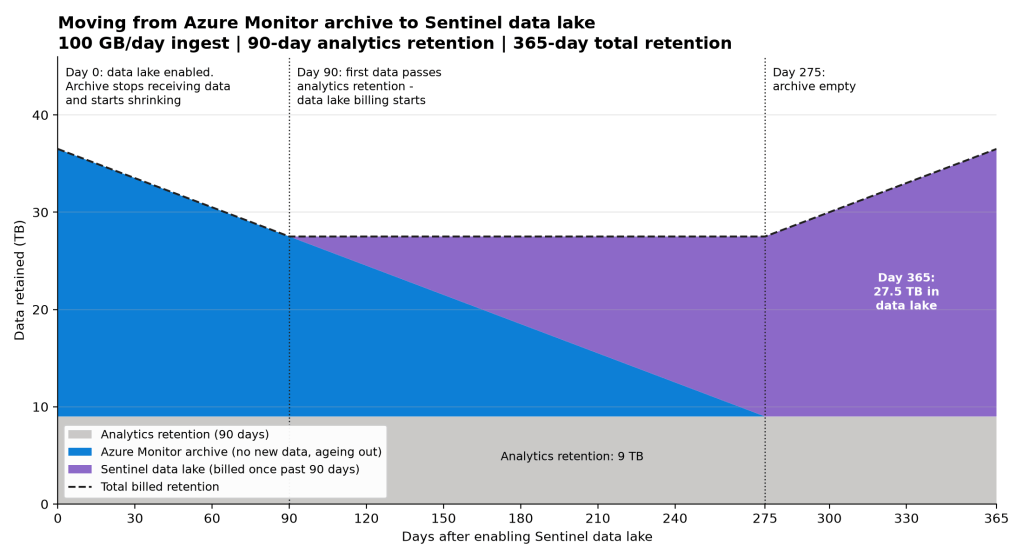
| Day | Analytics retention | Azure Monitor archive | Data lake (billed) |
|---|---|---|---|
| 0 | 9 TB | 27.5 TB | 0 |
| 90 | 9 TB | 18.5 TB | 0 |
| 180 | 9 TB | 9.5 TB | 9 TB |
| 275 | 9 TB | 0 | 18.5 TB |
| 365 | 9 TB | 0 | 27.5 TB |
There’s no point where you pay for the same data in both the archive and the data lake. One fills up as the other drains.
Now Let’s Put Pounds on It
Here are the UK South retail prices from the Azure Retail Prices API:
| Meter | Price (GBP) |
|---|---|
| Azure Monitor – Data Archive | £0.0189 per GB per month |
| Sentinel – Data lake storage | £0.0181 per GB per month |
On the face of it, those two prices look almost identical. The difference is compression. Data lake storage is billed on compressed data, with a typical ratio of 6:1 compared with the archive. So, 27.5 TB of raw data in the data lake is billed as roughly 4.6 TB. Per GB of raw data, that makes the data lake just over 6× cheaper than the archive.
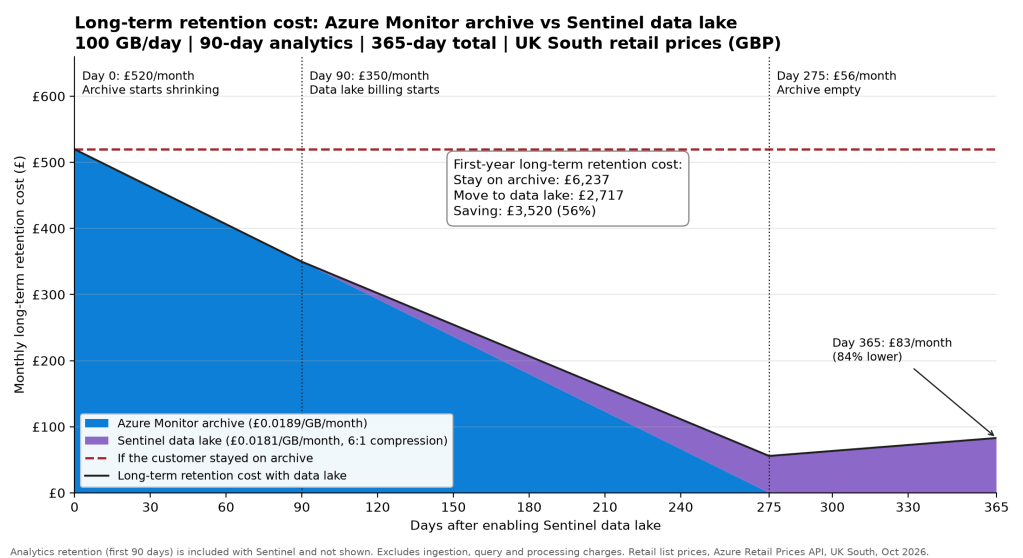
| Day | Monthly cost with data lake | Monthly cost staying on archive |
|---|---|---|
| 0 | £520 | £520 |
| 90 | £350 | £520 |
| 180 | £207 | £520 |
| 275 | £56 | £520 |
| 365 | £83 | £520 |
By the end of the first year, long-term retention for this workspace has dropped from about £520 a month to about £83 a month, which is 84% lower. Over the first year, the model works out at £6,237 if you stay on the archive and £2,717 with the data lake.
A couple of things stand out on the graph:
- The cost drops straight away. The archive starts draining on day one, but data lake billing doesn’t start until day 90.
- There’s a low point at day 275, then a gentle rise. That’s the point where the archive is empty and the data lake is still filling up to its full 365 days. Once it’s full, the cost levels off at the new, lower figure.
What about moving Data from Azure Monitor Archive to Data Lake storage?
During the design phase of Sentinel Data Lake, this was a conversation I remember many people having with our product group, and the consensus was something that the customers we consulted with were not willing to pay the costs.
When data is ingested into Sentinel, on the back end there are various components, including Azure Data Explorer clusters which in turn have storage accounts and compute (I am really simplifying a brilliant piece of technology). Transferring the data from one storage medium to another would require reengineering of the code, reading and writing the data from one storage medium to another and working out how to reindex the data in such a way that Sentinel / Log Analytics did not notice the difference. All of this comes with a cost and ultimately those customers decided the cost was not worth it.
But what about functionality?
This is the bit I like, you can now query your data as needed within Advanced Hunting, regardless of it being an analytic tier, data lake tier or in Data Lake retention. The more advanced scenarios have moved to Microsoft Fabric, which I will write more about in a later blog, but the key thing here is that it unlocks all the capabilities of Microsoft Fabric, without copying your data to Microsoft Fabric, you can run Notebooks, KQL jobs and more with the data residing in your Microsoft Sentinel Data Lake.
Is Data Lake data encrypted with our existing customer managed keys?
Yes.
Ok let me be clear, Microsoft documentation still says that customer managed keys are not supported.
If you deployed Sentinel Data Lake prior to 23rd September 2026, this required additional configuration that needed to be done by the customer and Microsoft Engineering to ensure that the system tables were encrypted via customer managed keys, because this was not something that was generally available for customers to configure themselves, it was still in preview and therefore not supported.
HOWEVER, for customers who have had Data Lake enabled by default from the 23rd September 2026 and are using customer managed keys on their workspaces, your data in both the Analytic and Data Lake tiers is and will continue to be encrypted with the same customer-managed keys. This means that you can continue working without worrying if your data is triple encrypted or not.
The small print
Before you take these numbers into a business case, here are some caveats:
- This is storage only. The analytics tier is not shown, because the first 90 days of retention are included with Sentinel and nothing changes there. Ingestion, data lake query, data processing and any other meters aren’t included.
- The 6:1 compression is a typical figure, not a guarantee. The actual ratio depends on your data. Highly repetitive logs compress better than others.
- It’s a simple model. It assumes a flat 100 GB/day, a full year of data already retained when you enable the data lake, and the transition behaviour described above. Real workspaces have growth, per-table retention settings and the odd surprise. In particular, check how data that’s already in analytics retention when you switch is handled. That affects the first-year figure more than the steady-state one.
- These are retail list prices. Your agreement may give you different rates. Prices change, and these are as of October 2026.
For a proper estimate, use the Microsoft Sentinel cost estimator or speak to your Microsoft account team.
Wrapping up
Moving from the Azure Monitor archive to the Sentinel data lake isn’t a cliff edge. It’s a gradual handover. The archive drains, the data lake fills, and you never pay for the same day of data twice. Because data lake storage is billed on compressed data, the long-term bill ends up a fraction of what it was.
If you’ve got a large archive today, it’s worth running your own numbers. The savings scale with your volume and how long you keep your data.
Alistair

